
Packing Video vs. Photos: What Each Can and Cannot Show
Packing photos and video answer different questions. A clear photo can make a serial number or condition detail easy to inspect. A continuous recording can show the visible sequence from item inspection through packing and the final seal. Neither format records events outside its view or establishes what happened after capture ended.
Choose the format around the question the record should answer. More footage is not automatically more useful, and a sharp image of a sealed carton does not reveal its contents.
Key points
- Photos can make a detail easy to inspect; video can show a visible sequence.
- Recording continuously does not remove blind spots, obstructions, or unreadable details.
- A frame extracted from video remains part of that video's source.
- Follow the reviewing service's submission instructions for an actual claim.

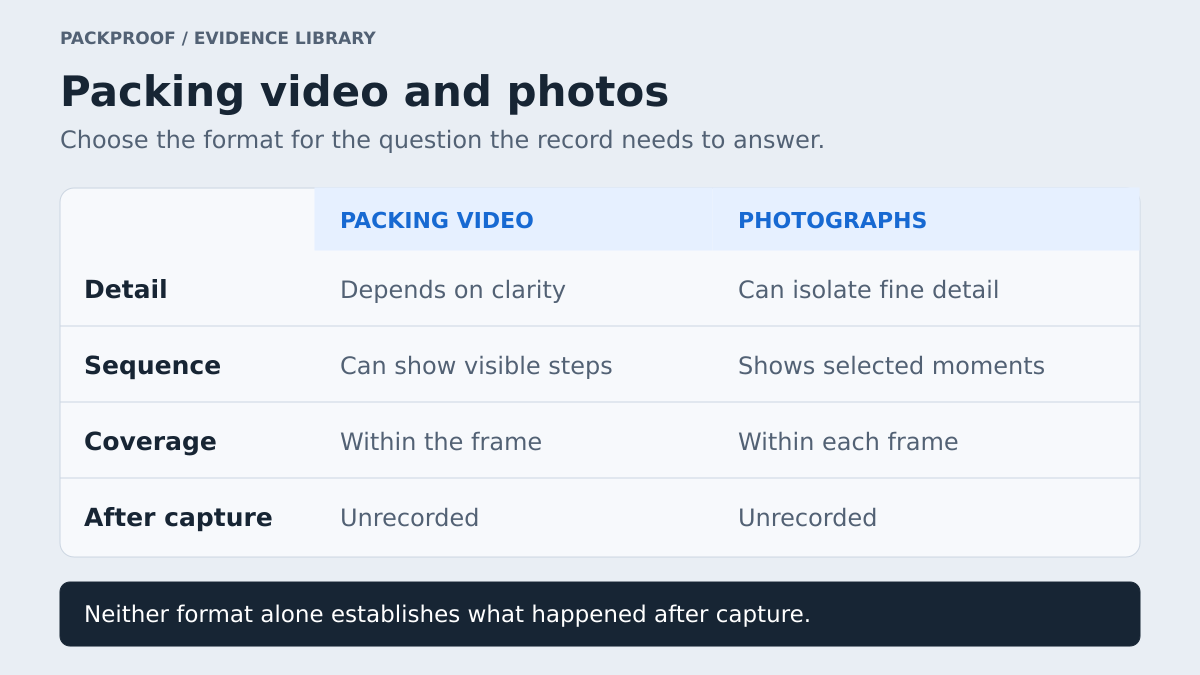
Diagram in words
Video can show visible packing steps, while photographs show selected moments and can isolate fine details. Detail depends on image clarity in either format. Video is limited by the frame and the recorded period; photos are limited by each frame and moment. Neither format by itself establishes events after capture.
Compare what the formats actually capture
| Review question | Photos | Continuous packing video |
|---|---|---|
| Can the identifier be read? | A focused close-up can be easy to inspect. | Useful if focus, framing, and resolution make it legible. |
| What condition was visible? | Detailed views can show specific surfaces and marks. | Can show multiple angles in sequence, but motion and glare may hide detail. |
| What entered the package? | Shows the arrangement at the instant photographed. | Can show placement if the item and action remain visible. |
| How did the item become a sealed parcel? | Separate images leave the intervals between them unrecorded. | Can show the transition through wrapping, placement, and closure. |
| What occurred after recording? | Not observed unless another source captures it. | Not observed unless another source captures it. |
This comparison concerns the information each medium can contain. It does not mean a particular carrier, marketplace, or payment provider accepts every file type or gives every recording the same weight.
Photos are useful for precise visual details
A well-lit close-up can reveal a readable certification label, a disclosed scratch, the edge of a holder, or an accessory's model. These images are quick to compare with a later photo and easy to reference in a short written explanation.
The limitation is the interval. One photo of an item beside a box and another of a sealed box leave the packing itself unobserved. Even timestamps close together do not show what occurred between exposures. A sequence of stills should be described as a sequence of stills, with that limit intact.
Photos can also omit context. A close-up of damage may show the mark clearly while leaving the item unidentified. Include an overall view that connects the detail to the item, and preserve the original files rather than relying only on screenshots pasted into a document.
Video is useful for the packing sequence
Video can show how the visible item moves into protective material, enters the carton, and becomes the sealed package. That relationship is valuable when the question concerns the packing process, included contents, or which parcel is associated with the order.
Continuity needs a usable view. A camera recording the ceiling while someone packs beneath it creates a continuous file, but little inspectable packing evidence. A carton wall, forearm, reflection, or autofocus failure can conceal a critical action without stopping the recording.
Set up the camera so the workspace remains visible, introduce the item's identity before wrapping, and hold labels steady long enough to read. Review the recording before dispatch. Use the clear recording workflow for camera setup and interruption handling, or the high-value shipment guide for the broader capture checklist.
Use an example to identify the missing question
Imagine a seller shipping a used camera with a battery and charger. Three possible records produce different answers:
| Available record | Supported observation | Remaining gap |
|---|---|---|
| Sharp photo of the camera and serial | The pictured item and readable identifier can be inspected. | Packing and included accessories are not shown. |
| Continuous wide video with a blurred serial | The visible packing sequence and accessory placement can be inspected. | The specific identifier cannot be read from that footage. |
| Clear identifier followed by visible packing through the seal | Both the readable identity detail and recorded sequence can be inspected. | Later transit and receipt remain outside that session. |
The third record is more informative for these particular questions. It still should not be described as proof of the buyer's eventual receipt condition.
Keep still frames connected to their video source
An extracted frame can help a reviewer find a key detail quickly. Label it as a frame from the recording and include its playback position when available. Retain access to the underlying video so the surrounding sequence can be inspected.
A frame does not add a new observation beyond the source video. Nor can it recover detail that was never recorded clearly. Enlarging a blurred serial number may make the pixels larger without making the number reliably readable. Avoid presenting an enhanced or annotated copy as an untouched original.
If you provide a separate close-up, identify it separately and state when it was captured. Do not suggest that every photo was taken during an uninterrupted session unless that relationship is supported by the record.
Match the material to the review process
For an actual claim, consult the current submission instructions. UPS's U.S. supporting-document guidance describes photos of the damaged item and its internal packaging, the shipping label, and the package exterior. That illustrates why an earlier outbound video may not answer a request about later damage.
Prepare a concise account with references to the relevant sources. If a service requests photos, provide appropriate photos according to its instructions; do not assume a shared video link replaces them. Keep the original capture available even when the submission format requires smaller files or selected views.
A practical choice for routine packing
PackProof recommends a clear continuous view for documenting the actual packing sequence, with enough time and focus to inspect the important details. The capture should fit the work being done and preserve its real limitations.
For review, make the relevant moments easy to find and keep sources distinct. Read the shipment evidence framework and digital evidence trustworthiness guide for the wider record model.
Explore the seller workflow, open a sample Proof, or browse Shipment Evidence.
Source reviewed
- UPS: Supporting documents for claims, United States — consulted for the example of claim photo requirements. Sources reviewed September 26, 2026. Format comparisons and capture recommendations are PackProof's editorial guidance.
See the record in context.
Explore how PackProof connects the order, available evidence, and shipping activity.
Open a sample Proof →