
How to Record Packing Clearly
To record packing clearly, stabilize the camera, test whether the saved footage shows the details that matter, keep the handling area visible, and review the result before dispatch. The useful standard is whether another person can inspect the recorded actions and limits. A recording indicator alone does not establish that the important action was visible.
This guide is for the person operating the camera at a packing station. The companion guide to what should be visible defines the coverage to aim for. The workflow below is PackProof's practical recommendation, not a carrier recording requirement or a guarantee about a future claim.
Key points
- Test the saved recording with the actual box, lighting, and smallest important detail.
- Arrange the workspace so hands and carton walls do not hide the packing actions.
- Record interruptions honestly; a later demonstration cannot restore a missed event.
- Review the saved file before dispatch and keep the original separate from edited copies.

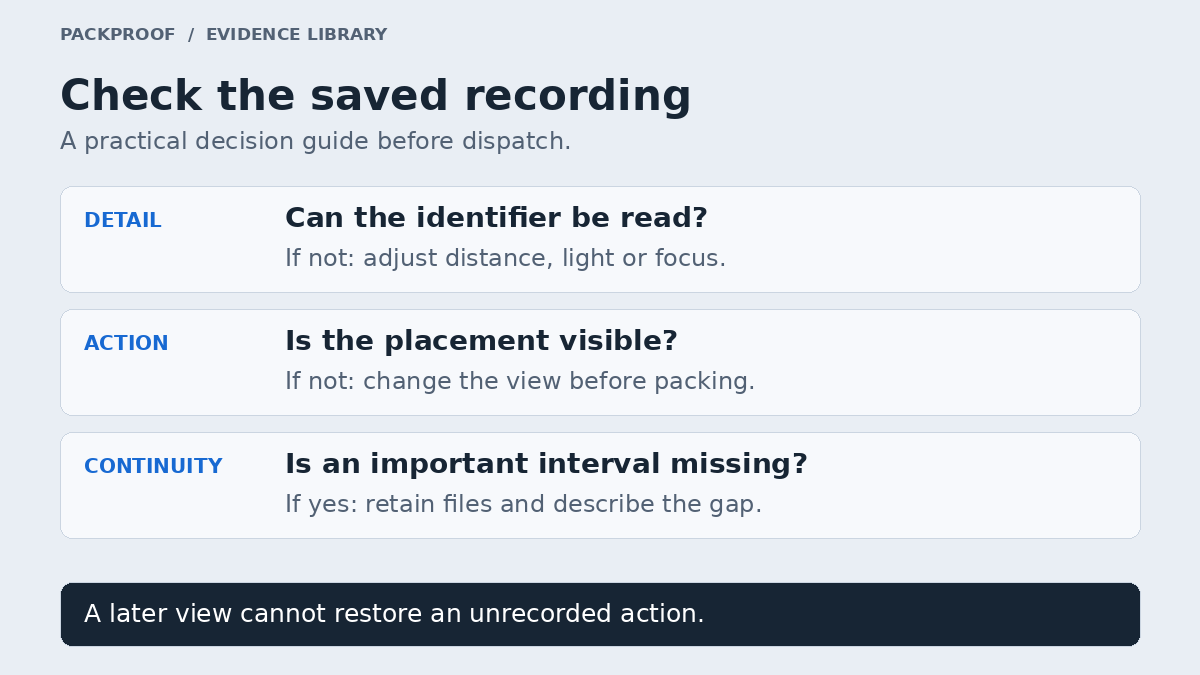
Diagram in words
Test the saved footage before actual packing. If an identifier is unreadable, adjust distance, light or focus. If placement is hidden, change the view before packing. If an important interval is missing from the actual recording, retain available files and describe the gap. A later view cannot restore an unrecorded action.
1. Arrange the workspace around the camera view
Set out the item, included accessories, open carton, protective material, and tape before capture. Clear unrelated orders from the working area. Put frequently used tools within reach so collecting tape does not require taking the item or carton out of view.
Choose a stable camera position with enough height and angle to see inside the carton during placement. An overhead view can show the work surface but miss a vertical label; an angled view can show a label but lose the bottom of a deep box. Test the position with the actual packaging. There is no single camera angle that works for every object.
Keep the device supported independently of the box you will move. Check that reaching across the table will not knock the support and that cables do not interfere with handling. Use a setup that lets you handle the item safely; do not balance a phone above fragile goods just to obtain a preferred shot.
Remove private information that is not needed for the record from the background, including other orders, payment details, and open account screens. Keep necessary shipment identifiers in a controlled record. A public example should use a separately labeled redacted copy, not expose the recipient's full address.
2. Test the recording, not just the preview
Make a short test using the same capture tool you will use for the shipment. Show the smallest relevant identifier and a difficult surface, such as a reflective holder or dark corner. Move your hands through a normal packing action, then play the saved test back.
Check three things: can you read the identifier without guessing, can you distinguish the relevant condition detail, and can you follow the movement into the box? A bright live preview may look reassuring while a saved recording contains glare, blur, or an obstructed action.
| Problem in the test | Adjustment to try | Check again in playback |
|---|---|---|
| Label is too small | Bring it closer within the camera's usable focus range, then hold still. | Every relevant character is readable. |
| Glare covers the surface | Change the light or item angle while keeping the object identifiable. | The reflection no longer hides the detail. |
| Focus shifts to hands | Move hands away from the detail and allow focus to settle. | The intended surface stays sharp long enough to inspect. |
| Box wall hides placement | Change camera height or working position before the real capture. | The item entering the carton remains visible. |
| Motion blurs the item | Slow the movement and pause at important views. | A paused frame shows the detail clearly. |
Do not choose a resolution or frame rate solely because its number is larger. Use settings that your device, storage, and capture workflow support reliably, and judge the result by playback. Check available space and power before beginning. Where the device permits it, reduce avoidable notification interruptions without disabling functions the capture tool needs.
3. Use deliberate movements during the actual packing
Start while the item and packing area are visible. Introduce the item before wrapping conceals identifying features. When moving from a close view back to the wider workspace, keep the item's movement understandable. Pause for focus rather than sweeping quickly past several surfaces.
Place accessories where they can be counted, then show their movement into the package. Position your hands so the camera can see the action as far as practical. A spoken description can help a reviewer navigate, but saying that a charger went into the box does not make the charger visible behind a forearm.
Keep recording through the packing actions you intend to document. If you rotate the carton to show another closure surface, avoid moving it outside the frame. End only after the intended final view is complete. For the broader order, condition, packing, and dispatch record, use the high-value shipment checklist.
4. Handle interruptions without rewriting the sequence
An interruption changes what the recording can support. First preserve the material that exists; then decide what can still be recorded honestly.
| What happened | Useful next action | Limit to retain |
|---|---|---|
| Capture stopped before any packing began | Correct the issue and begin a new actual packing session. | Keep the test distinct from the shipment record. |
| Capture stopped during wrapping | Retain the first file and record the remaining work, if possible. | State where the unrecorded interval occurred. |
| An identifier was unreadable | Capture a separate readable view if the item is still accessible. | Identify it as a separate observation, not detail recovered from the first file. |
| The item was already sealed when a gap was found | Record the current parcel state and note the missing step. | The sealed parcel does not reveal the missed packing action. |
Do not reopen and repack an item solely to present the second sequence as the original event. If a real repack is necessary, describe it as a repack and preserve its relationship to the earlier material. A joined or trimmed presentation should not be labeled an uninterrupted original.
5. Review and retain the saved result
Before dispatch, open the saved recording and check the beginning, the important details, the packing transitions, and the ending. Confirm that the file plays beyond its thumbnail and that its order association is correct. If a system is still saving or uploading, verify completion through that system before treating the record as available elsewhere.
Keep the original capture. Put summaries, selected stills, redactions, and compressed submission copies alongside it with clear labels. Record playback positions for useful moments instead of making a reviewer search the whole video. The digital evidence guide explains why file integrity and the truth or completeness of a scene are separate questions.
An outbound video also has a defined endpoint. It does not show later handling, recipient opening, or damage discovered after delivery. UPS's U.S. claim guidance describes photographs of damage, internal packaging, the label, and the package exterior. A clear earlier packing video does not replace those later observations or the service's current submission instructions.
Use the packing video and photos comparison when a separate close-up would answer a detail question more clearly. Browse Shipment Evidence or open a sample Proof to see how the capture can sit within a wider record.
Source and editorial scope
- UPS: Supporting documents for claims, United States — reviewed October 3, 2026, for the distinction between outbound capture and claim documentation.
The setup, playback checks, and interruption table are PackProof editorial guidance. They are not a technical standard, a statement that a service accepts video, or an assurance of a dispute outcome.
See the record in context.
Explore how PackProof connects the order, available evidence, and shipping activity.
See the seller workflow →