
Packing Evidence for Electronics: Serial Numbers, Accessories, and Power-On State
Useful packing evidence for an electronic device should connect the particular unit to the transaction, show relevant visible condition, identify the included components and accessories, describe any limited operation that was actually demonstrated, and follow the same unit into the finished parcel. These are separate questions. A readable serial number does not show condition, and one successful startup does not establish that every feature works.
This guide is a documentation workflow, not a diagnostic test, appraisal, warranty decision, data-erasure procedure, or certification of packaging. Follow the manufacturer and carrier's current instructions for the particular device, battery, service, and destination.
Key points
- Connect each serial number, IMEI, or component identifier to the physical source where it appears.
- Record visible condition, included accessories, and limited operation as separate observations.
- Describe a power-on demonstration narrowly; it does not establish every function or future performance.
- Protect account details, addresses, full public identifiers, and other personal information when creating derivatives.

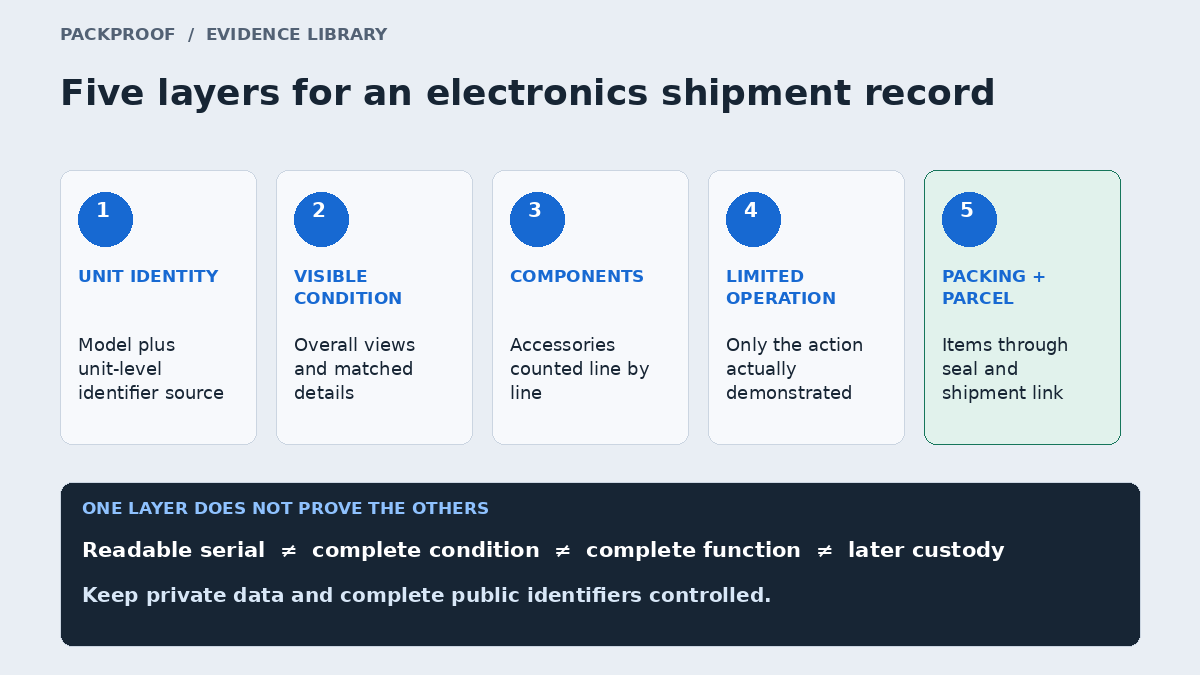
Diagram in words
Five separate layers for an electronics shipment record: exact unit identity, visible exterior condition, included components and accessories, narrowly described operation, and the connected packing and parcel sequence. No layer by itself establishes complete condition, function, ownership, authenticity, or later custody.
Build the device record in five layers
The five-layer model keeps common electronics claims from being compressed into one broad statement such as “tested and working.”
| Layer | Question to answer | Useful observation | Important limit |
|---|---|---|---|
| Unit identity | Which labeled device or component is shown? | Model plus a readable unit-level identifier on an authoritative surface | A copied value does not by itself connect the number to the physical unit |
| Visible condition | Which exterior areas were actually clear? | Overall views plus matched details of disclosed marks, display, housing, ports, controls, and lenses where relevant | The recording cannot reveal every internal or angle-dependent condition |
| Included components | What entered this shipment with the main unit? | A line-item list and visible count of chargers, cables, controllers, docks, batteries, lenses, or other promised items | Similar-looking accessories can still be misidentified without a stable reference |
| Limited operation | What specific action or state was demonstrated? | A bounded observation such as startup to a visible screen or one control responding | One demonstration does not establish all functions, configuration, battery health, or later performance |
| Packing and parcel | How did the identified items enter protection and the sealed shipment? | A connected item-to-accessory-to-parcel sequence ending with the final seal and label | The outbound record does not observe later custody, transit, delivery, or opening |
Plan the five layers before recording. If a layer is not relevant, mark it not applicable rather than silently omitting it. If it is relevant but cannot be captured safely or without exposing private data, state the limitation.
Identify the exact unit and the source of each value
Start with the model or product description, then record the unit-level identifiers that matter to the transaction. A phone may have a serial number and more than one IMEI. A camera kit may have separate body and lens serials. A laptop bundle may include a dock, keyboard, stylus, or charger with its own identifier.
Manufacturers often provide several identifier surfaces. Apple's support guidance lists device settings, the device or SIM tray on supported models, Finder or Apple Devices, an Apple Account, and original packaging as possible sources. Google's device guidance lists settings, Find My Device, packaging, and physical device locations for supported products. Microsoft's Surface guidance distinguishes the Surface app, Settings, the device, UEFI, service records, packaging, and separately labeled accessories.
These locations can contain matching values without becoming the same evidence source. Preserve the distinction:
| Value source | What the record can say | What it should not imply |
|---|---|---|
| Physical device label or engraving | The recorded characters were visible on this physical surface | The label is authentic, ownership is established, or the unit functions |
| Device settings or firmware screen | The running device displayed this value at the recorded moment | The exterior label necessarily matches unless that comparison is also shown |
| Original or replacement packaging | The package displayed this value | The device inside must be the corresponding unit |
| Account or service page | The service associated this value with an account record | The physical device in the video is automatically the same unit |
| Typed inventory or order record | The transaction expects this value | The characters were observed on the physical item |
Where practical, show an overall view of the device, move to the identifier surface, hold long enough for the characters to be readable, and return to the whole unit. The general identifier guide explains how to classify product, unit, transaction, and shipment references without treating them as interchangeable.
Separate the main unit from its components and accessories
“Includes charger” may be too vague for a bundle with several power adapters, detachable cables, controllers, batteries, or mounts. Use an accessory ledger that mirrors the order or listing.
| Line | Item or component | Identity detail | Quantity | Capture status |
|---|---|---|---|---|
| 01 | Laptop body | Model and serial stored in restricted record | 1 | Exterior, ports, identifier, and limited startup recorded |
| 02 | Power adapter | Wattage and model as printed | 1 | Label and connector shown |
| 03 | Detachable cable | Connector type and visible length category | 1 | Included in group view and packing sequence |
| 04 | Stylus | Model and unit identifier if present | 1 | Identifier not readable; limitation recorded |
The examples are synthetic. Use the actual transaction description and complete private values in the authorized record.
For kits with individually identified components, complete one unit sequence before moving to the next. For visually similar accessories, place the ledger line or order context near the corresponding view. A group photograph can support a count, but it may not make every model, connector, or identifier inspectable.
Record condition with matched overall and detail views
Electronics combine reflective surfaces, small ports, dark housings, screens, lenses, moving hinges, and removable panels. Use an overall → detail → overall pattern so a close-up remains connected to the correct device.
Choose condition views from the transaction, not from a generic checklist. Relevant areas might include:
- Display and exterior housing.
- Corners, edges, feet, and hinge areas.
- Ports, buttons, switches, slots, and connectors.
- Camera or lens glass visible without disassembly.
- Battery compartment or removable cover only when ordinary safe access is part of the transaction.
- Disclosed scratches, dents, chips, cracks, residue, missing pieces, or prior repair marks.
Avoid whole-device conclusions such as “mint” or “no damage” when the recording covers only selected exterior views. Prefer language such as “the recorded display powered on and no crack was visible in the front view” or “the left rear corner was obscured by the protective case.”
Do not open sealed housings or remove parts merely to improve the record. If a serial sits behind a component that should not be disturbed, use another manufacturer-documented source and identify it accurately.
Define a power-on observation before performing it
A useful power-on record starts with a narrow question. Decide what action is safe, relevant, and permitted before recording.
| Demonstration | Bounded statement the record may support | What remains outside that statement |
|---|---|---|
| Device reaches a visible startup or setup screen | The recorded device displayed that screen during this session | Battery endurance, every sensor, port, radio, account state, or later startup |
| Display shows an image without an obvious interruption in the recorded view | The visible display produced that image at the recorded angle | Pixel-level testing, color accuracy, touch performance, or hidden intermittent faults |
| One button, dial, controller, or port responds | That control produced the recorded response once | Every control, long-term reliability, internal condition, or performance under load |
| Camera or lens produces one visible preview or image | The recorded combination produced that preview or image | Sensor cleanliness, stabilization, focus across all ranges, shutter count, or future performance |
State the action, result, and limit together. “Powered on to the setup screen at 10:14; no network, battery-duration, port, or camera test was performed” is more reviewable than “fully tested.”
Do not expose a password, unlock code, account email, contact list, message, precise location, network name, device-management detail, or another person's data for the sake of the recording. If a private screen appears in the original, keep access restricted. A public or support derivative should be deliberately redacted and labeled as a derivative.
This guide does not tell a seller whether or when to sign out, reset, erase, remove management, or disable a security feature. Those steps can affect data and device access; use the current manufacturer or organization process for the specific transaction.
Keep identifiers and private data out of public copies
The complete serial or IMEI may be useful to an authorized buyer, manufacturer, carrier, insurer, marketplace, repair service, or internal reviewer. It does not belong automatically in a public listing, social post, or educational screenshot.
Retain the full value in the restricted transaction record. For a public derivative, obscure enough characters to prevent reconstruction and remove account names, addresses, shipping labels, barcodes, QR codes, and screen content that reveals personal or security information. Keep the original separately and record that the redacted image is a transformed copy.
Redaction makes the public copy safer, but it also means that copy cannot support a full-character comparison. Preserve the source-to-derivative link rather than calling the redacted image an untouched original.
Follow every line item into the final parcel
Prepare the device, components, selected packing materials, and outer parcel before recording. Use the carrier and manufacturer requirements that apply to the exact item, battery, service, and destination. The evidence workflow does not replace hazardous-material, battery, packaging, or transport rules.
Record the identified main unit and accessories entering their protection and parcel. If an item leaves the frame, a battery is packed separately, or the bundle is divided across parcels, state the assignment. Continue through the final seal and shipment reference.
Before dispatch, replay the saved record and ask:
- Is the exact device or component identity readable from an identified source?
- Are model, serial, IMEI, order, and tracking references labeled by scope?
- Are promised accessories counted and matched to the correct ledger lines?
- Does each condition close-up return to an overall view?
- Is every operation statement limited to what was actually demonstrated?
- Are private data and full public identifiers controlled deliberately?
- Does the visible sequence continue through the correct sealed parcel?
- Are inaccessible surfaces, camera gaps, untested functions, and later events stated as unknown?
The high-value collectibles guide provides the wider identity/condition framework, while the high-value shipment guide covers the final order-to-parcel review. Browse Collectibles & High-Value Items or inspect a sample Proof for the surrounding record structure.
Sources and editorial scope
Sources reviewed November 7, 2026:
- Apple Support: Find the serial number, EID, or IMEI — official device, settings, computer, account, and packaging locations for supported Apple identifiers.
- Google Store Help: Find your device serial number and model — official settings, account, packaging, physical-location, and dual-SIM identifier guidance for supported Google devices.
- Microsoft Support: Find a Surface or accessory serial number — official Surface app, Settings, device, firmware, service, packaging, and accessory locations.
- UPS: Supporting Documents Required for Claims — current claim-document context naming serial number, brand, size, color, and quantity as useful merchandise-description details.
The five-layer model, source table, accessory ledger, matched-view sequence, power-on matrix, privacy workflow, and review questions are PackProof editorial guidance. They do not authenticate a device, certify function or condition, determine claim eligibility, or establish events after capture.
See the record in context.
Explore how PackProof connects the order, available evidence, and shipping activity.
Open a sample Proof →